
For multi-outlet F&B
Every outlet, audited. Every day.
Replace paper checklists and WhatsApp photos. Your teams run daily checks on their phones; you see today's progress, audit scores and open fixes for every outlet.
14 days free · No credit card
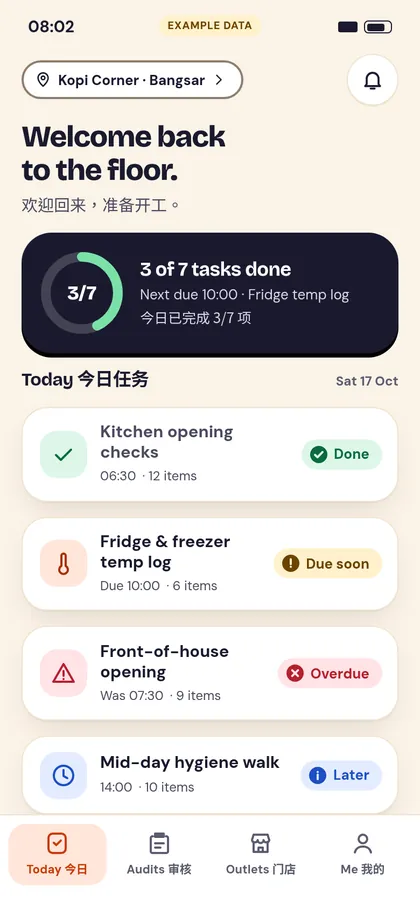
Design preview with example data. The live app may look different.
Paper and WhatsApp don't scale past one outlet
The same morning checks, minus the chasing.
Before Ronda
- Paper sheets that get lost, wet or filled in at the end of the day
- Photo proof buried in WhatsApp groups
- No idea which outlet skipped a check until something goes wrong
- Problems noticed, then forgotten
With Ronda
- Checklists on every phone, with Pass / Fail / N/A and a note on any item
- Photo evidence attached to the exact item
- One board of today's progress, latest audit score and open fixes for every outlet
- Failed items become fixes with a due date and a close note
Up and running in three steps
- 1
Build your checklists
Start from a template or write your own, in English and 中文. Assign them to outlets and set the due time and days.
- 2
Teams inspect on their phones
Staff tick items and snap photos on their own phones. Nothing to install from an app store.
- 3
HQ sees scores and fixes
Every audit gets a score. Failed items become fixes with a due date, tracked until a manager closes them.
Everything a floor manager and an owner need
Built for kitchens, counters and dining rooms, not for office compliance teams.
Daily checklists that actually get finished
Big touch targets, one item at a time, English and 中文 labels.
- Pass / Fail / N/A with a note on any item
- Photo-required items: submit is blocked until the photo is attached
- Starter templates for opening, closing and a manager walkthrough
Photo evidence and scored audit reports
Take the photo where the problem is. It stays with that line of the audit.
- Photos are compressed on the phone to save data
- Automatic score with grade bands: Excellent, Good, Pass, Fail
- Audit report with photos: print it, or send a link on WhatsApp (team members sign in to view)
Fixes that close the loop
A failed item becomes a fix with a due date, and stays on the list until a manager closes it with a note.
- Due date set automatically (3 days) when the audit is submitted
- Overdue fixes are flagged
One view across every outlet
Owners and managers see today's progress without calling anyone.
- Today's board: completion, latest audit score, open and overdue fixes per outlet
- Staff roster by shift, shareable on WhatsApp
- Roles for owner, manager and staff; staff only see their own outlets
Simple per-outlet pricing
Pay for the outlets you run, in Malaysian Ringgit. Every account starts with a free trial.
Per outlet, per month, in Malaysian Ringgit. Existing customers keep their current rate until the end of their current subscription period.
Starter
RM 79.00
per outlet / month
- Unlimited staff
- Checklists and audit templates in English and 中文, with starter templates
- Photo-required items that can't be skipped
- Automatic score with grade bands
- Audit report with photos, print and WhatsApp share link
- Fixes from failed items, with a due date and close note
- Today's board across all outlets
- Staff roster
- CSV export, all plans
14-day free trial. No credit card needed.
No SST is charged; prices shown are the final amount payable (in RM).
Running a franchise group or many outlets? Ask us when you sign up.
Questions, answered
How much does it cost?
Pricing is per active outlet per month: RM79. Prices are final: no SST is charged. Existing customers keep their current rate until the end of their current subscription period.
Is there a contract?
Plans are billed monthly. Billing terms are in our draft Terms of Service and will be confirmed before launch.
Do I need a credit card to try it?
No. Every account starts with a 14-day free trial, no card needed.
Do my staff need to install an app?
No. Ronda runs in the phone browser and can be added to the home screen. It needs an internet connection.
Can I use English and Chinese?
Yes. Checklists and the app support English and 中文.
Can I get my data out?
Yes. CSV export on every plan, including Starter: owners and managers download audits, items, fixes, outlets and team from the Export page. Photos are not included in the CSV.
Where is my data and who can see it?
Each organisation's data is kept separate and only its own team can open it. Read our draft Privacy Policy for details, including how we handle personal data.
Will you help us get started?
Yes. Ask us when you sign up and we will help set up your first outlets and checklists.
Welcome back to the floor.
Set up your first outlet in minutes. Free for 14 days.